Beto MorescaFor personal trainers and online coaches
The whole business of coaching people, in one system.
I built this for a personal trainer. You keep doing what already works, posting and talking to people. The system takes it from there: someone who taps your link lands on a page that sells for you, buys or books a call, and becomes a student you run from one place. Now I build it for other coaches.
Thirty minutes. You tell me how you coach now, I tell you what it takes to build it.
Built for
One coach at a time, with their own name on it
Runs on
Your Stripe, your domain, your accounts
Students use
A web app they install on the home screen
Built by
Me. One developer, start to finish
What happens, in order
Seven steps from someone tapping the link in your bio to money in your bank. Each one is a part of the system, not a separate tool you pay for and glue together. Finding people stays your job. This makes the ones who already found you worth something.
Step 1
A landing page that captures the lead
Your page shows who you are, what you do and the results you get, with your Instagram feed pulled in and kept fresh. Anyone who is interested either buys or books a call, and either way they land in your back office as a lead with the source recorded. Nothing gets lost in a DM.
studioone.com
Book a call
New lead
Jordan P. from Instagram
Step 2
Packages sold online, or after a call
Your packages sit on the page with a checkout behind them. Someone who is ready pays by card and becomes a student straight away, with the welcome email and the onboarding questions sent automatically. Someone who wants to talk first books a call instead. The original build had three offers: exercise, nutrition, and both together.
studioone.com/packages
Exercise
Book a call
Nutrition
Book a call
Both
Book a call
Stripe subscriptionActive
Step 3
The call, then the agreement they sign on their phone
The booking page reads your calendar, offers only times you are free, and creates the meeting with a video link. After the call you turn the lead into a deal, send the coaching agreement, and they sign it with their thumb. You countersign. Both of you keep a copy, and the signed version is locked so nobody can quietly edit it later.
Studio One · booking
Thursday
09:00
11:30
15:00
Coaching agreement
jordan p.
Signed on a phone, 14:02
Step 4
Plans built from templates, not from scratch
There is a library of exercises with illustrations, and you can add your own with a video clip. You build a programme once as a template and clone it onto each student, then adjust. Meal plans work the same way, with foods, macros against daily targets, recipes and swaps. Editing publishes a new version and the old one stays in the history.
Studio One HQ · programme builder
Back squat4 x 6RPE 8
Romanian deadlift3 x 1060 kg
Split squat3 x 12each side
Lunch620 kcal · 48 g protein
Chicken, rice, green beans
Swap rice for 150 g potato
Step 5
The week to week coaching
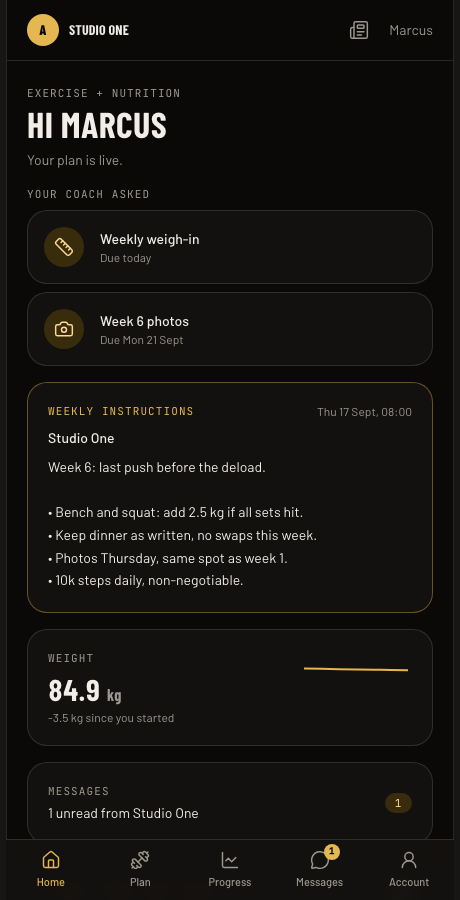
Students open their app and see today's session and today's meals, your pinned instructions for the week, and anything you have asked them for. They tick sets off, log meals, photograph what they eat and enter their numbers. You see the charts, the photos side by side and the adherence without chasing anyone. Messages go both ways in one thread per student, and can carry on over WhatsApp.
Student portal
Check-in due
Weigh in and send photos
Knee felt fine today.
Good. Add a set next week.
Photo of lunch attached.
Step 6
Money you can see without a spreadsheet
Card payments, subscription renewals, fees and refunds arrive from Stripe by themselves. You type in expenses with a photo of the receipt. One screen shows the month, revenue per package, recurring revenue, who is overdue and what is left after costs. There is a CSV export for your accountant.
Studio One HQ · finance
Active students
24
Monthly recurring
Up
Overdue
1
Subscription renewalPaid
Invoice 0142Sent
Gym rentExpense
Step 7
Help with the posting
A calendar of what goes out and when, across Instagram, TikTok and YouTube. A trend finder watches what is working in fitness and nutrition and reports back with the hook and why it works. Turn any of those into a draft and the caption gets written in your voice from a brief you control, for you to edit before it goes anywhere.
Studio One HQ · social
M
T
W
T
F
Draft caption
InstagramTikTokYouTube
The real screens
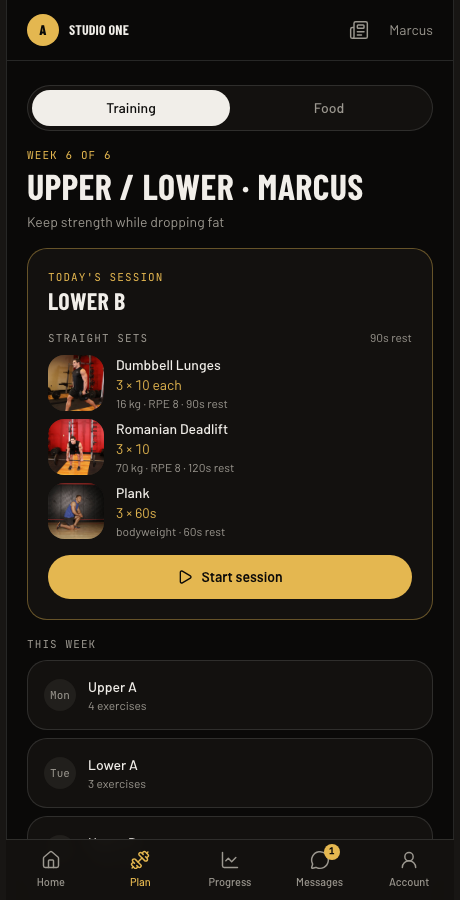
Screenshots from a running copy of the system, filled with demo data. The coach here is called Studio One and the student is called Marcus, both made up for the demo.
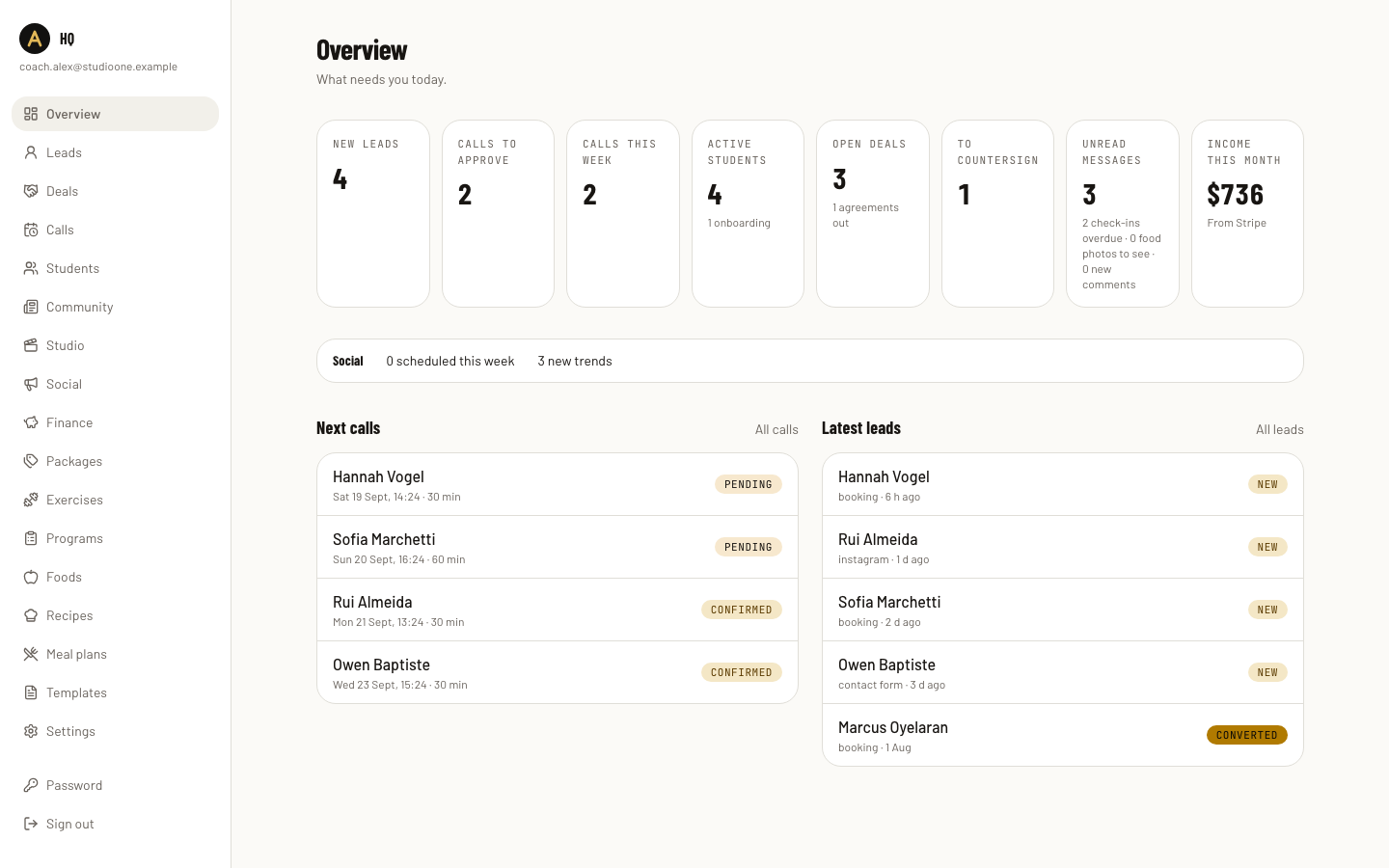
The back office opens on what needs you today: new leads, calls, unread messages.
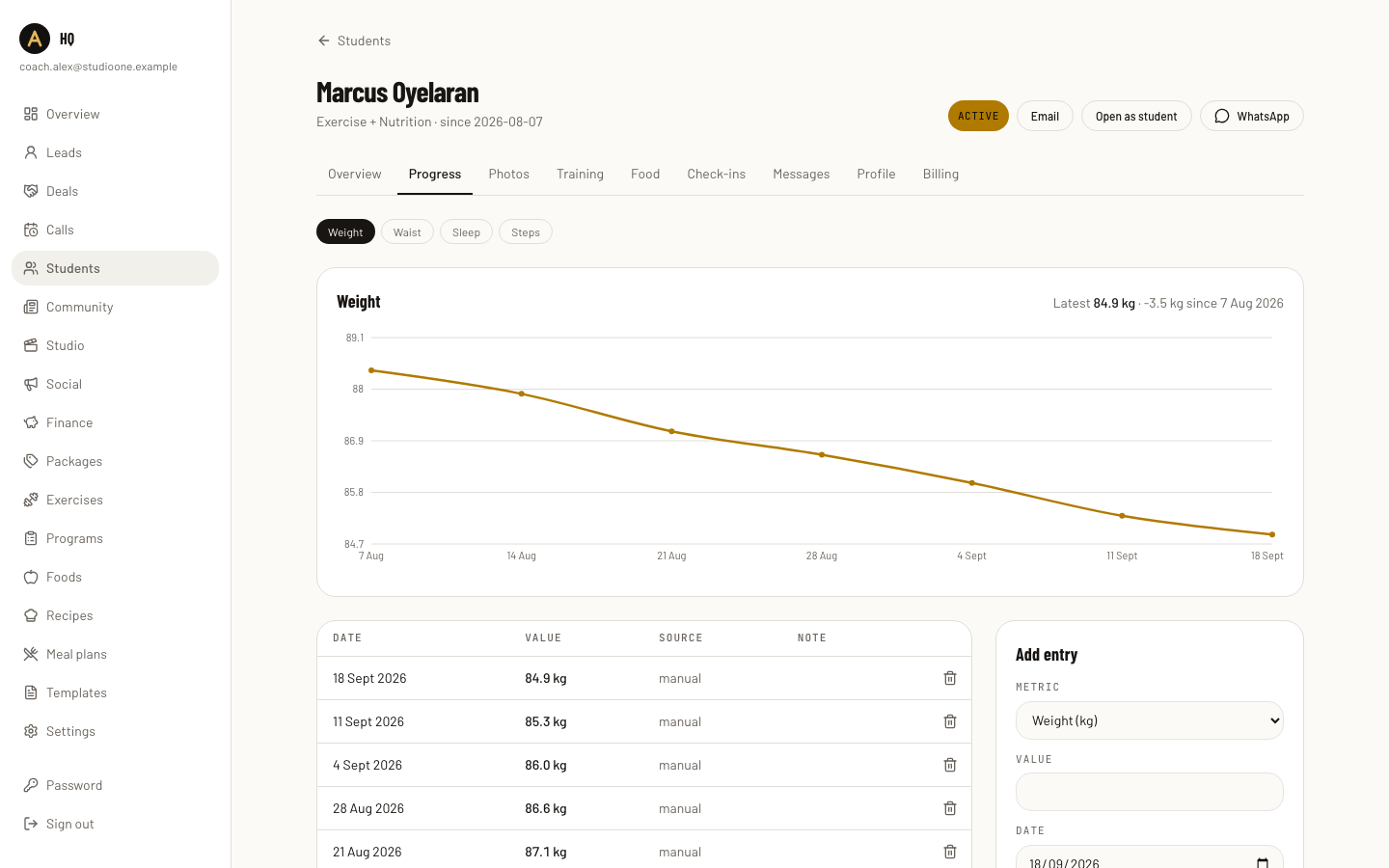
Every student has a page with their numbers, photos, plans, messages and billing.
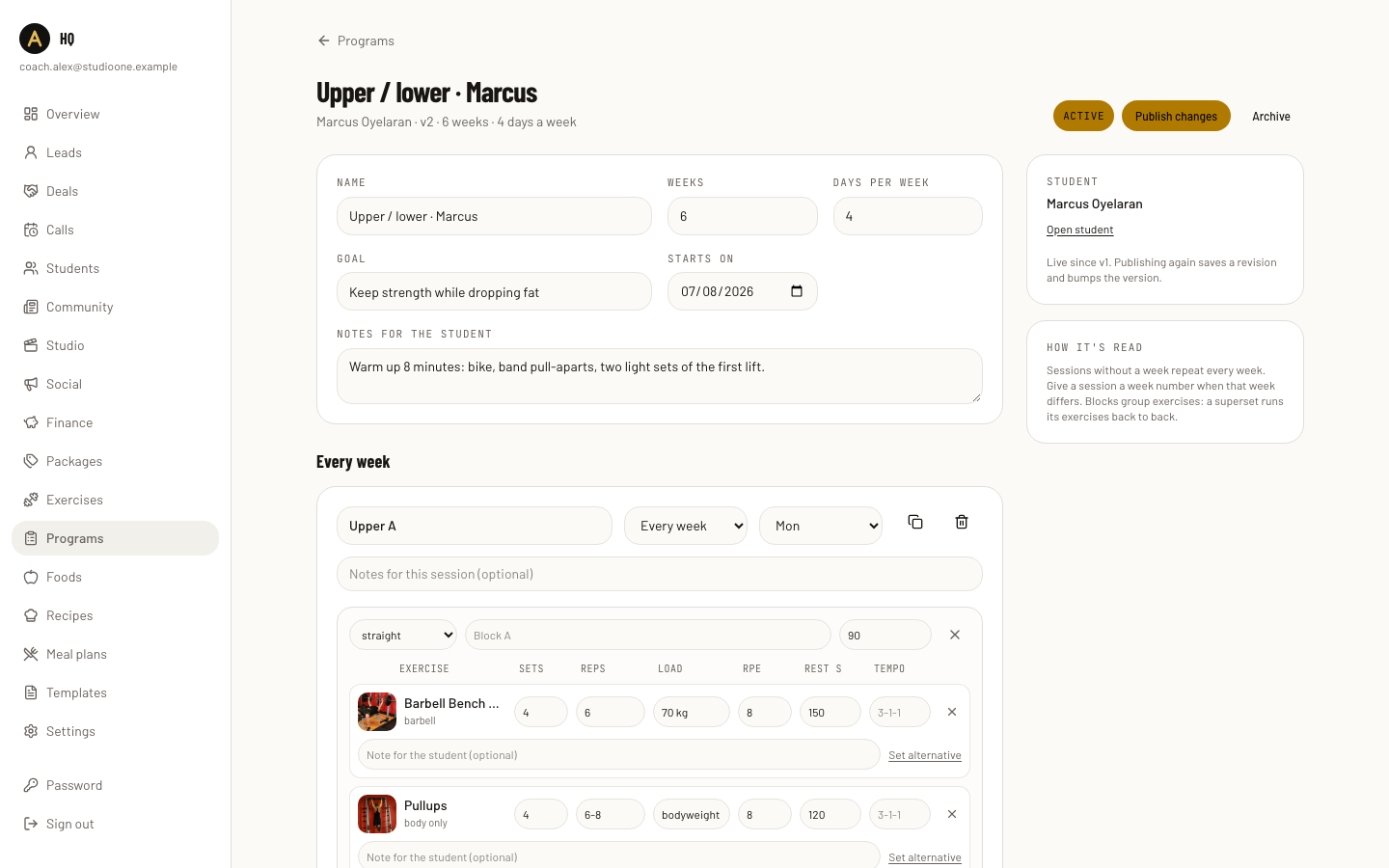
The programme builder. Sets, reps, load, RPE, rest and a note per exercise.
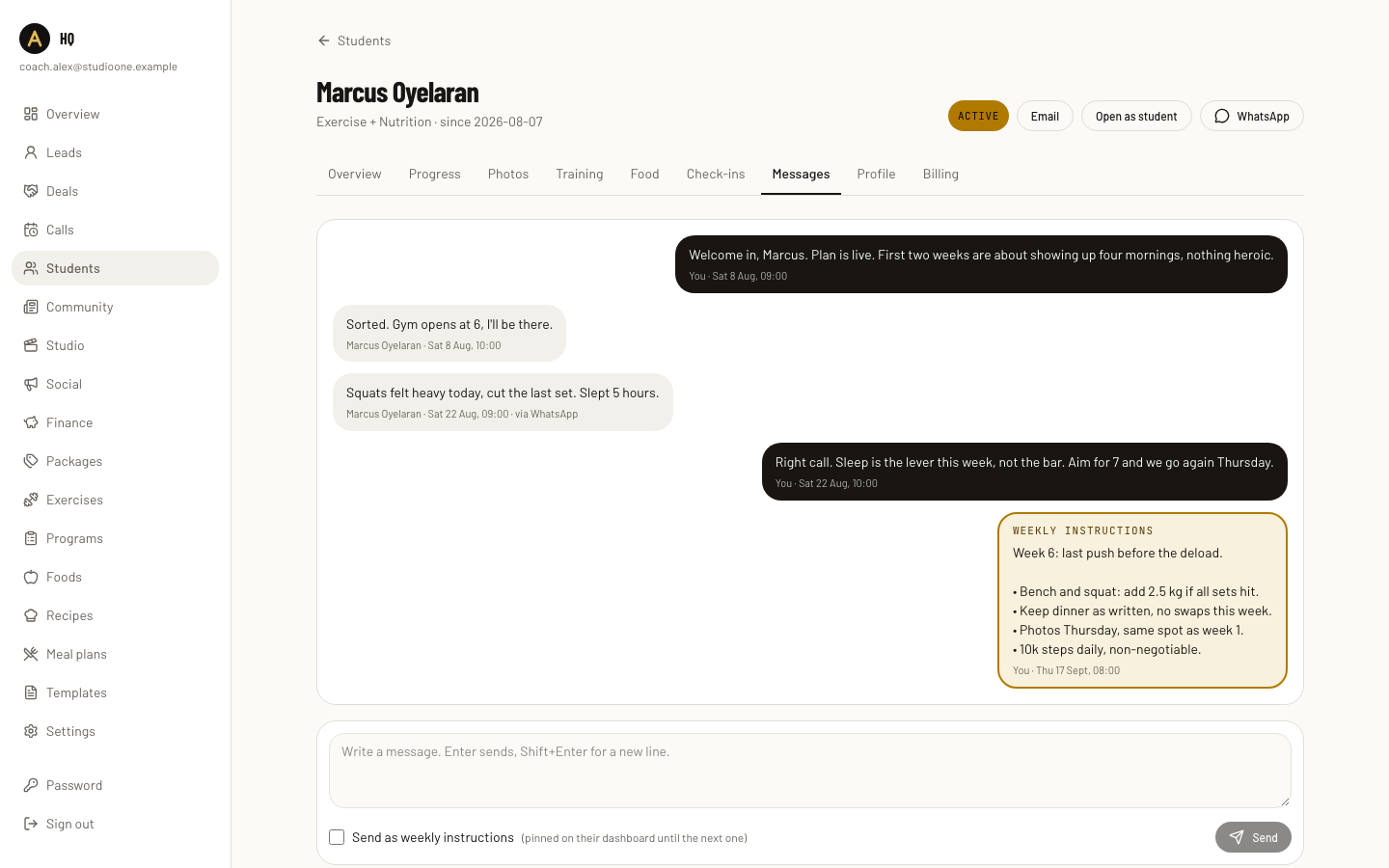
One thread per student. Tick the box and a message becomes the week's instructions.
What the student sees on opening the app.
Today's session, with a video for each exercise and sets to tick off.
Two apps, two jobs
You get a back office built for running a coaching business. Your students get a small app they can keep on their home screen.
What you get
A public page with your Instagram feed, your packages and a booking calendar.
Leads, calls and deals in one pipeline, with where each one came from.
Coaching agreements sent, signed and countersigned online.
Invoices, subscriptions and card payments through your own Stripe account.
A programme builder and a meal plan builder, with templates and versions.
A student hub: profile, metrics, photos, plans, messages, food journal.
A newsletter to your students, with comments and replies.
A finance screen and a CSV export.
A social calendar, trend research and drafted captions.
What your student gets
A web app that installs on the home screen and opens like any other app.
Today's session with the video for each exercise, and sets to tick off.
Today's meals with macros, recipes and one tap to ask for a swap.
Your pinned instructions for the week.
Check-in requests that tell them what you need and when.
Charts of their own numbers and their progress photos side by side.
A message thread with you.
Your posts, and a place to comment on them.
Their own billing, with a card they can change themselves.
Book a call with me
Pick a time below. Tell me how many students you have, how you sell now and what you are sick of doing by hand. I will tell you what I would build and what it costs to run.